How is my reading made?
Your transits, eclipses, numbers and Chinese year are calculated from your birth details. The written interpretation is then drafted by AI from those results, following our method, and sent to you straight away. It isn't read by a person first, which is why it arrives in minutes.
Is this a horoscope?
No. A horoscope is written for everyone with your sun sign. This reading is calculated from your exact birth details, so the transits, dates and houses are yours alone.
Do I need the Blueprint first?
No. The 2027 reading stands on its own and asks only for your birth details. If you have a Blueprint already, the two sit well together: one is who you are, the other is what this year asks of you.
What if I don't know my birth time?
You still receive your transits, eclipses and numerology. Houses and Human Design need at least an approximate time, and a parent, your baby health book or the hospital where you were born are the best sources (Australian birth certificates don't show the time).
How is it delivered?
It opens on the page as soon as it is written, usually within a few minutes, and arrives by email too. It is digital, so nothing is posted.
Can I ask questions about my reading?
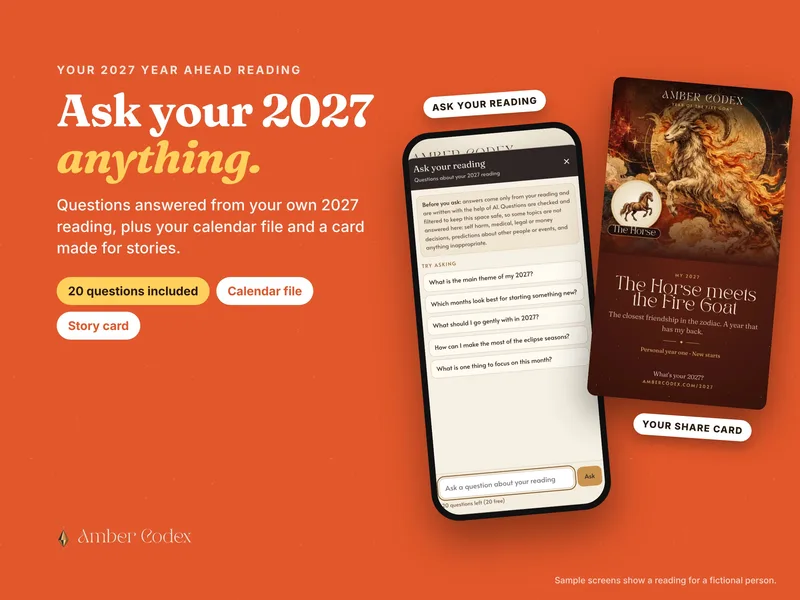
Yes. Your reading has an Ask your reading button with 20 questions included, answered only from your own 2027 reading. What is the main theme of my year? Which months suit starting something new? Questions are checked and filtered, so medical, legal, money and self harm questions aren't answered there. You can add 20 more for $5 from inside your reading if you want to keep going.
How do I add my 2027 calendar?
Open your reading and tap Calendar in the bar at the bottom of the screen. Choose the calendar you use (Apple, Google, Samsung or Outlook) and follow the steps shown, then tap Download calendar. Import the file once only: importing it again adds every event twice.
Adding it to Google Calendar on my phone
The Google Calendar app can't import a calendar file, so you add it once through Google Calendar's website instead. Download the calendar from your reading first. Then in Chrome or Safari go to calendar.google.com and switch to the desktop version (Chrome: the three-dot menu, then Desktop site; Safari: aA, then Request Desktop Website). Tap the gear, then Settings, then Import & export, choose the file from your Downloads and tap Import. The events then appear in the app within a few minutes. On a computer it is the same steps without the desktop switch. Google's own help.
Adding it to Apple Calendar (iPhone, iPad or Mac)
On iPhone or iPad, open your reading in Safari (not inside your email app), tap Download calendar, then Add All. If it saves a file instead, open it from the download arrow in the address bar or from the Files app, under Downloads. On a Mac, double-click the downloaded file and choose a calendar. Apple's own help.
Adding it to Samsung Calendar
Download the calendar from your reading, then open the file from your notifications or from My Files, under Downloads. Choose Calendar if your phone asks which app to use, pick the account to save to and tap Save. If it opens in the Google Calendar app instead and adds just one event, follow the Google steps above.
Adding it to Outlook
The Outlook phone app can't import a calendar file, so do this once on a computer. In Outlook on the web or the new Outlook, open Calendar, choose Add calendar, then Upload from file, pick the file and tap Import. In classic Outlook on Windows, double-click the downloaded file. The events then show on your phone too. Microsoft's own help.
Nothing downloads, or my events appear twice
If nothing happens when you tap Download, you have probably opened your reading inside an email or social media app. Use its menu to open the page in Safari or Chrome, then try again. Events showing twice means the file was imported twice. Tip: in Google or Apple Calendar, create a new calendar called something like "My 2027" and import into that. You can then hide it, or remove every event at once, without touching your other plans.
Can I give the 2027 reading as a gift?
Yes. Buy a 2027 gift card ($22). You get a printable card with a code to give them, and you can change the names and message afterwards. They start their reading at ambercodex.com/2027 and enter the code at checkout, so it costs them nothing. They add their own birth details, so you don't need their birth time, and their reading is written and emailed to them. Each gift card has its own checkout, so buy one per person. Want to give other things too, or several gifts at once? See the gifts in our shop, where up to 8 items go in one order and each can be given to a different person.
What about refunds?
Because each reading is written for you, it isn't a change-of-mind purchase. If anything goes wrong, contact us and it will be put right. See the refund and delivery policy.








 02Checkout